How to add or remove page breaks in Flat
Last updated September 23, 2026
A page break in Flat is a deliberate division of the score between two pages, placed where you want the music to continue on a new sheet. Flat adds and removes them measure by measure, so a single document can hold several pieces, separate movements, or a set of parts.
What is a page break?
A page break in music notation is a deliberate division of the score between two pages to enhance readability for musicians. With this feature you can:
- Include different scores all in a single document
- Separate orchestration parts into distinct scores within one document
- Compose entire concerts with various movements all in one place.
... and much more!
How do I add a page break?
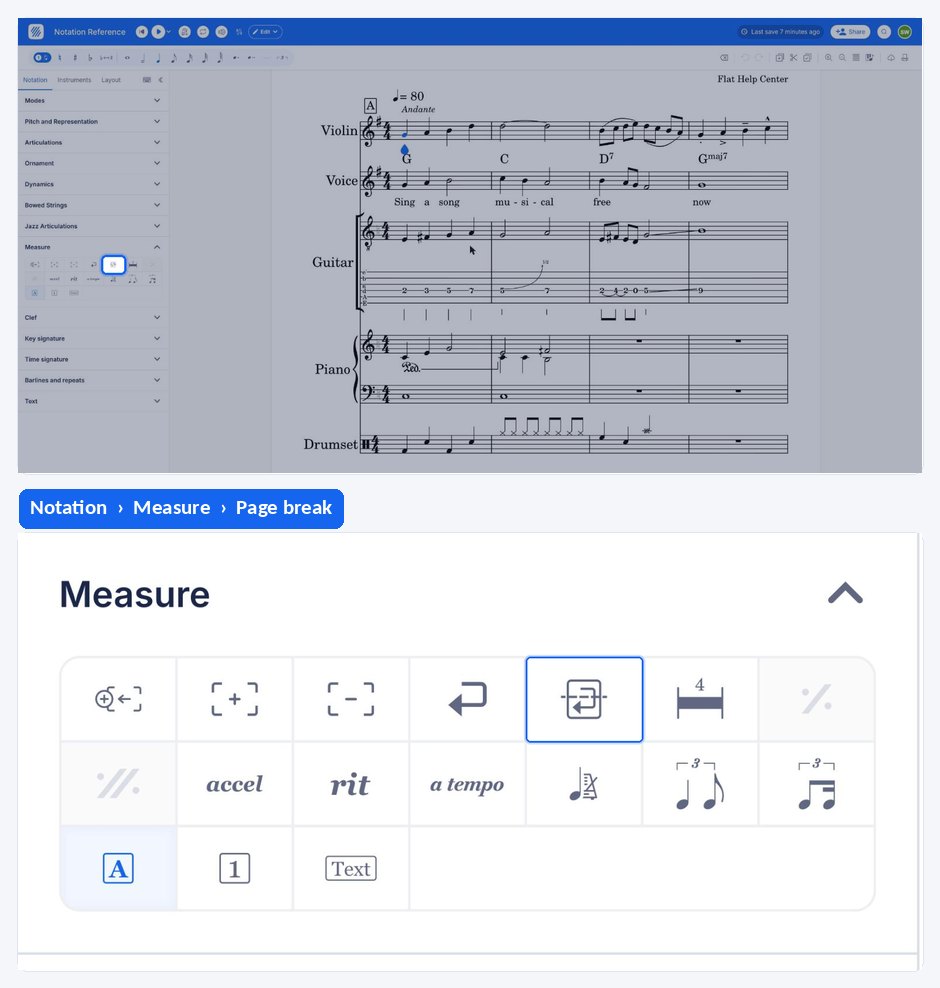
Place your cursor on the measure that should start the new page, then click the page break icon in the Measure section of the Notation tab. Flat then divides the score at that point, so the music continues on a new page.
How do I remove a page break?
To remove a page break, you can either:
- Click on the page break on the page then click on delete
- Place yourself where you added the page break and click once again on the page break tool.
Frequently asked questions
Can I put several pieces in one Flat document?
Yes, and page breaks are how you separate them. Breaking the score between two pages lets one document hold different scores, orchestration parts kept as distinct scores, or a whole concert of movements, each starting cleanly at the top of its own page.
Does a page break change the music itself?
No. A page break is a layout instruction: it decides where the score is divided between two pages so it is easier to read. The measures and their contents are unaffected - remove the break and the music flows on exactly as before.
How do I control how many measures fit on each line?
That is a layout setting rather than a break. The Layout tab of the left panel holds the page and system options, including Max. number of measures per line, which fixes the number of bars per system instead of letting Flat fit them to the width.