How to add accidentals and double accidentals in Flat
Last updated September 23, 2026
An accidental in Flat is a sign that raises or lowers a note outside the key signature. Flat writes sharps, flats, and naturals, cycles through double sharps, double flats, and courtesy accidentals from the same button, and can prepare an accidental so it applies to the next note you write.
Where are the accidental buttons?
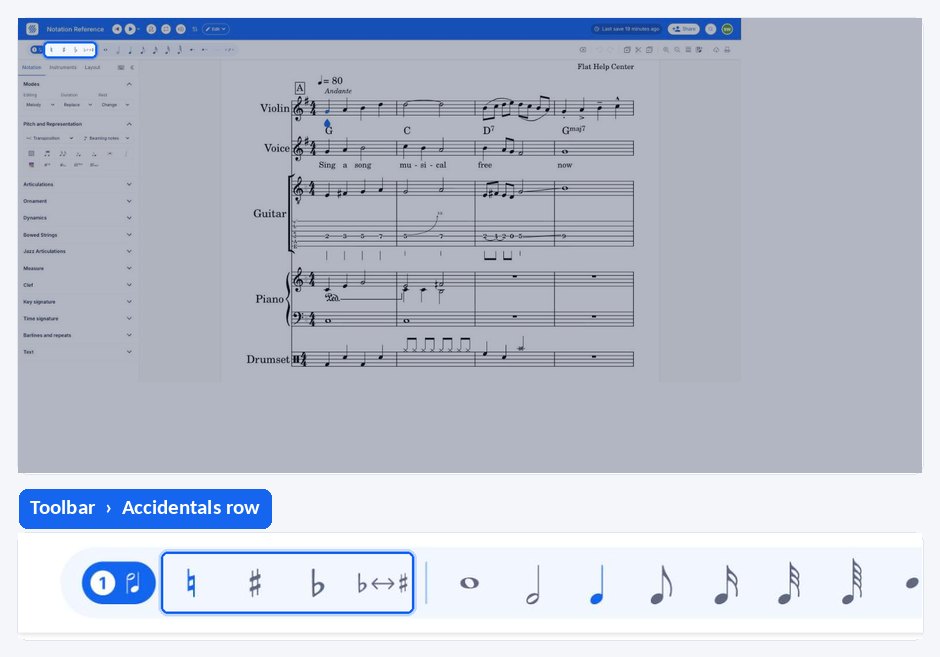
The accidentals sit in the compact strip above the left panel, alongside the duration buttons, so they stay available whichever tab of the left panel is open. Each one also has a keyboard shortcut, which keeps your hands on the keyboard while you write a chromatic passage.
| Accidental | Keyboard shortcut |
|---|---|
| Natural | 0 |
| Sharp | = |
| Flat | - |
How do I add an accidental to a note?
Click the note you want to alter, then click the accidental you need - sharp, flat, or natural - in the strip above the left panel. Flat writes the sign in front of the notehead and adjusts playback to match. Clicking the natural button on an altered note removes the accidental.
How do I write a double accidental or a courtesy accidental?
Click the same accidental button several times on the same note. Flat cycles through adding the accidental, adding a double sharp or double flat, removing it, and adding a courtesy accidental - the reminder sign printed in brackets or without brackets to confirm a pitch to the performer.
Can I prepare an accidental before I write the note?
Yes. If your cursor is on a rest rather than on a note, clicking an accidental prepares it instead of applying it: the next note you write is created with that accidental already in place. This is quicker than writing a note and altering it afterwards when you are entering a chromatic line.
How do I add an accidental to a note?
Flat writes a sharp, a flat, or a natural in front of the notehead you selected and adjusts playback to match the altered pitch. Applying the natural sign to an already altered note removes its accidental and returns the note to the pitch of the key signature.
Tap the note you want to alter, drag the tool palette up from the bottom of the screen, and tap the sharp, flat, or natural you need under Notation. The accidentals sit in the same section as the note durations, so you can write a note and alter it without changing section.
How do I write a double accidental or a courtesy accidental?
Applying the same accidental repeatedly to one note cycles Flat through four states: the accidental, a double sharp or double flat, no accidental, and a courtesy accidental - the reminder sign that confirms a pitch to the performer without changing it.
Tap the same accidental again on the selected note, and again, to move through the four states in turn. A fifth tap returns the note to where it started.
Can I prepare an accidental before I write the note?
Yes. With the cursor on a rest rather than on a note, an accidental is prepared rather than applied: the next note you write is created with that accidental already in place. This saves a step when you are entering a chromatic line note by note.
Tap a rest rather than a note, then tap the accidental you want under Notation. The button stays highlighted, and the next note you write on that rest is created with the sign already in front of it.
Frequently asked questions
How do I remove an accidental from a note?
Apply the natural sign to it, or keep clicking the accidental you added until the cycle returns to no accidental. Both routes bring the note back to the pitch implied by the key signature, and Flat updates the playback at the same time so what you hear matches what is written.
What is a courtesy accidental and when should I use one?
A courtesy accidental is a reminder sign that confirms a pitch without changing it, typically after an accidental earlier in the bar or in the previous bar. Flat produces one by cycling the same accidental button on a note, so you can add reminders wherever a performer might hesitate.
Can I write quarter-tone accidentals in Flat?
Yes, but they are a separate premium feature and must be enabled for the part first. Once enabled, four quarter accidentals become available alongside the usual ones. See how to use quarter-tones for enabling them and writing them into a score.