How to add and remove voices in Flat
Last updated September 23, 2026
A voice in Flat is an independent rhythmic line written on the same staff as another one. Flat lets a single staff carry several voices, which is how you write a divisi for a string section, two players sharing one staff, or chords whose notes have different durations.
Where do I find the voice tools?
The voice tools sit in the compact strip above the left panel, next to the accidental and duration buttons, so they stay available whichever Notation section you are working in. The button opens the voice menu, and V toggles between the voices of the current staff.
| Tool | Icon | Keyboard shortcut |
|---|---|---|
| Switch voices |  | V |
How do I add a second voice on a staff?
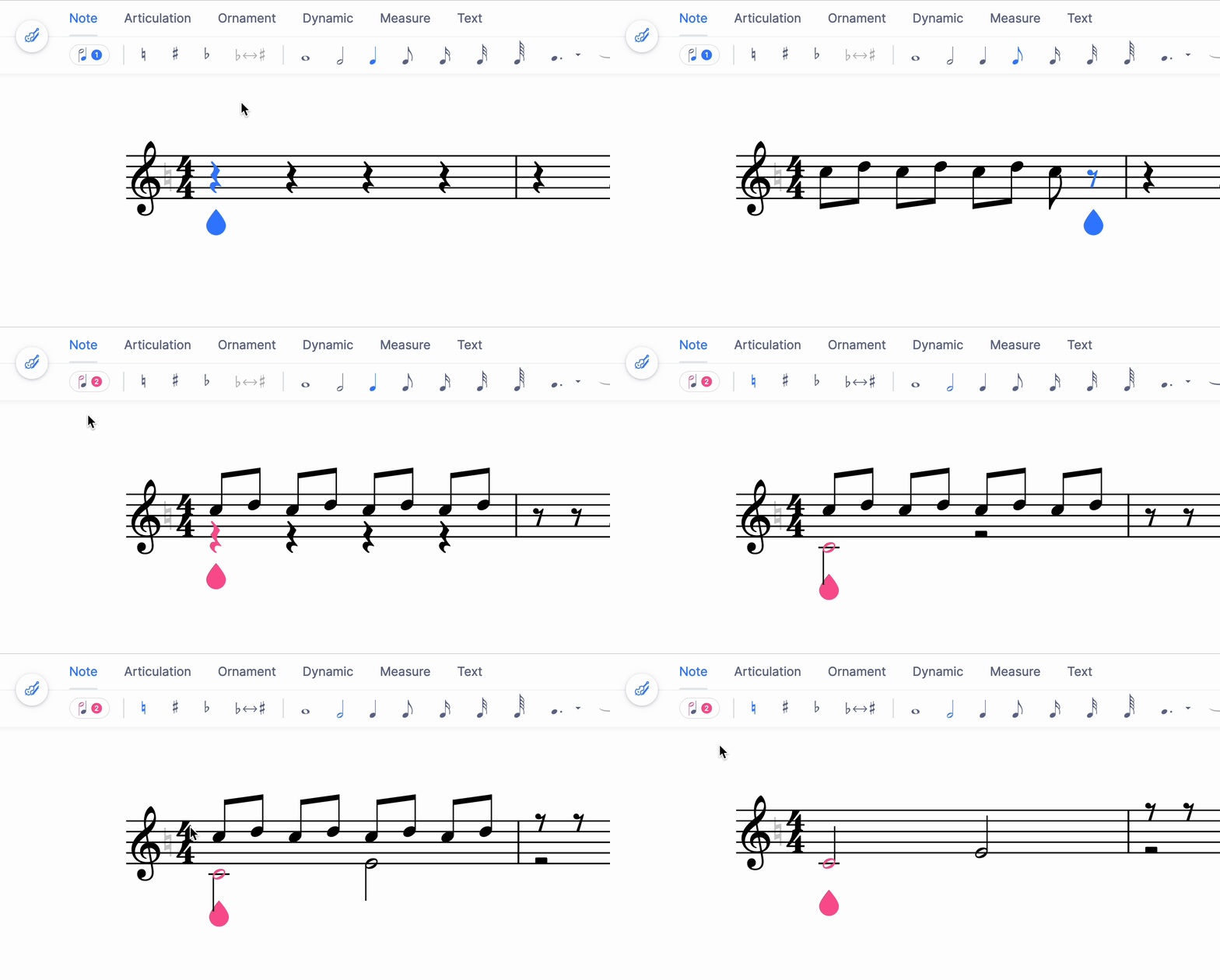
To add multiple different durations or rhythm sequences that play at the same time in a single staff, use multiple voices. Click the Switch voices button above the left panel, then choose Voice 2. Use the same button to toggle between voices and to remove one, or press V to switch.
For string instruments in an orchestra, you can also use this feature to write a divisi. It can also be used to write chords with different durations.
How do I split a staff or swap its voices?
From the voice drop-down you can also reach the tools that act on voices and staves as a whole: splitting a staff into two, so that each player gets their own part, or swapping the voices assigned to notes to invert the stem directions on a selected range.
How do I add a second voice on a staff?
Voices let a single staff carry several independent rhythms at once. A second voice is what you use to write a divisi for a string section, to give two players sharing one staff their own line, or to write chords whose notes have different durations.
Tap the voice button at the left of the toolbar under the transport, then choose Use voice 2. The same menu switches back and removes a voice again.
How do I split a staff or swap its voices?
Two related tools act on voices and staves as a whole: splitting a staff divides one staff into two, so each player gets their own part, and swapping the voices exchanges the voices assigned to the notes in a selected range, inverting their stem directions.
The same voice menu holds Split staff and Swap voices, which act on the staff and on the selected range rather than on a single note.
Frequently asked questions
How do I remove a voice I no longer need?
Use the same voice button you used to add it. It both toggles between the voices of the staff and removes one, so you select the voice you want gone and remove it from that menu. The remaining voice keeps its notes and goes back to normal stem directions.
What is a divisi and why does it need two voices?
A divisi splits one section — the first violins, say — into two lines that play different music at the same time while sharing a staff. Two voices give each line its own rhythm and stem direction, so the players can read their own part without the notation becoming ambiguous.
Why do my stems point the wrong way?
Stem direction follows the voice a note belongs to: the upper voice points up, the lower one down. If the notes went into the wrong voice, use swap voices on the selected range to exchange them, which flips the stems without retyping the music.
Should I use a second voice or a second staff?
Use a voice when the two lines share a staff, as in a divisi or a chord with mixed durations. When each player really needs their own part — a staff shared by two instruments, for instance — split the staff instead, so the music ends up on two staves.