How to split a staff in Flat
Last updated September 23, 2026
Split staff in Flat is a tool that takes one staff and extracts its content onto two staves. Flat splits by voice when the measures contain two voices, and by chord notes when they contain chords, so a staff shared by two instruments can be turned into a separate part for each player.
Where do I find the Split staff tool?
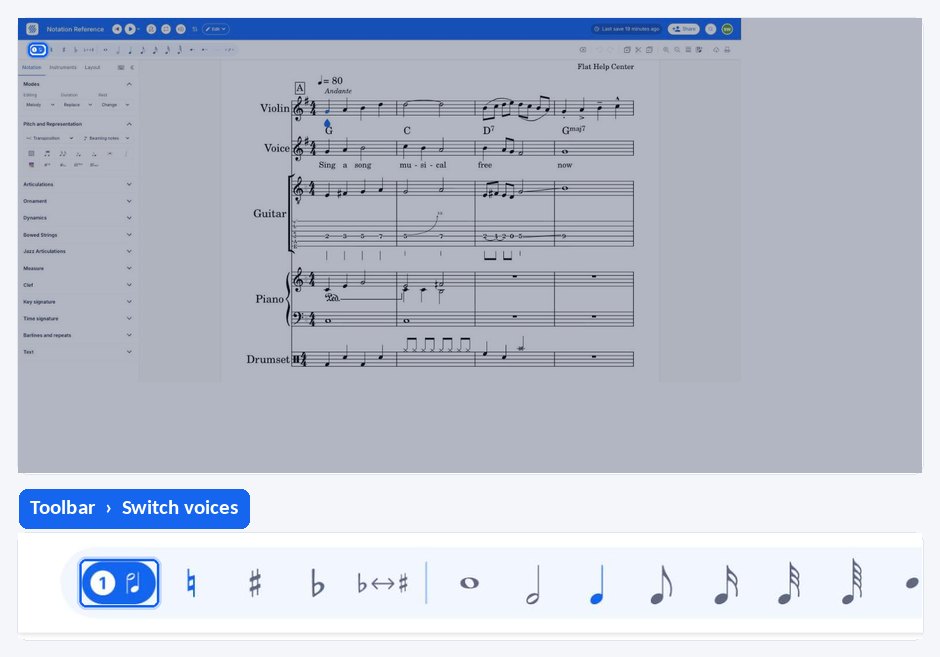
Split staff sits in the voice menu, opened from the Switch voices button in the compact strip above the left panel. It stays available whichever Notation section you are working in, and it acts on the staff your cursor is currently in.
| Tool | Where to find it | Icon |
|---|---|---|
| Split Staff | Voice menu, above the left panel |  |
When should I split a staff?
Use this tool when there is a staff that is shared by two instruments, and when you want each player to have their part. Instead of retyping the music, Flat extracts what is already written on the staff and lays it out on two staves, either inside the same part or as two new parts.
What happens when Flat splits a staff?
What Flat sends to each new staff depends on what the measures contain. Two voices are separated one per staff; chords are divided by their notes. The rules below apply measure by measure, so a staff that mixes both cases is handled accordingly.
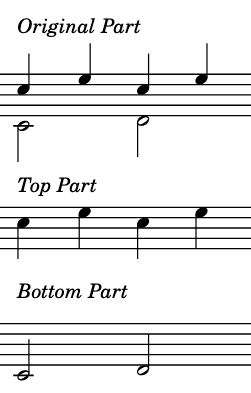
When a measure contains two voices, each newly created staff will receive the content of one of the voices.
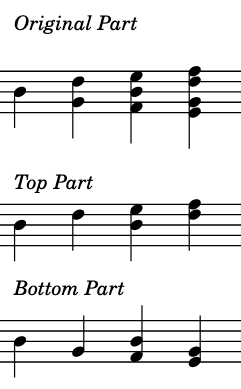
When a measure contains chords, each newly created staff will receive half of the notes of the chord. If a chord contains an odd number of notes, the middle note will appear in both staves.
How do I split a staff?
Place the cursor in the staff you want to split, open the voice menu and choose Split Staff. Flat then offers the options: two staves within the same part or two new parts, and keeping or removing the original staff.
Place the cursor in the staff
You need to place the cursor in the staff you want to split, so that Flat knows which music to extract.
Choose your options
From here you have access to some options. You can either split the staff into two other staves within the same part, or you can create those staves into two new parts. You also have the choice to keep the original staff or to remove it.
Frequently asked questions
What is the difference between splitting a staff and adding a voice?
Adding a voice keeps both lines on one staff, which suits a divisi or a chord with mixed durations. Splitting the staff moves that content onto two staves, so each player reads their own line — the right choice when two instruments were sharing a single staff.
Does my music need two voices before I can split a staff?
No. Two voices are separated one per staff, but a staff written with chords splits too: each new staff receives half of the notes of each chord. Both cases are handled measure by measure, so a passage that mixes voices and chords is still split in one pass.
What happens to a chord with an odd number of notes?
The middle note appears in both staves. Flat cannot divide an odd number of notes evenly between two staves, so it writes the middle one on each of them rather than dropping it, and you can then edit either staff as you would any other.
Can I keep the original staff after splitting it?
Yes. The options offered when you run the tool include keeping the original staff or removing it, alongside the choice between creating the two new staves inside the same part or as two new parts.